Tuesday
BUSINESS AND ACCOUNTING COURSES - from traditional to blended delivery...
Course delivery included flexible scheduling for mornings or afternoons, five-days per week, with approximately 30-weeks required for full completion of diploma courses. Traditional classroom lectures were provided optional online activities, MyLabs exercises, and online quizzes, in addition to in-person proctored exams and group projects.
I also served as LMS Champion and Scheduler to move course delivery away from paper textbooks to the use of online e-Textbooks, LMS Course Outlines, and integration with Apple iPad devices. In the span of 300-days, over 90% of training programs were successfully transitioned into a fully online resource environment, and maintained compliance with provincial legislation.
Overall, our e-learning developments connected with over 3,000 students per year in the Alberta region, and thousands more across the nation. In Calgary, we also developed on-site group networking activities and work simulations: we partnered students with real-world business partners and developed training projects to showcase their work to local organizations. Yearly, four out of five students gain employment in their field of interest immediately upon completing their training and program requirements.
Thursday
Hello!
| Moshi Moshi Manual Cellphone Handset Posted: 18 May 2011 08:03 AM PDT In these days of the ubiquitous cellphone, it can be rare to use a "normal" phone, even if you spend most of your days desk bound. As much as I love my iPhone, when I'm sitting in my office I miss using my desk phone with its comfortable handset and easy to dial keypad. Additionally, as someone who likes to listen to music when I work, an incoming call on my iPhone means unplugging it from the cradle, a minor annoyance. Native Union has solved my problem with a series of handsets that allow you to take calls using a traditional handset attached to your cellphone. I picked up the MM02, a fairly basic corded model featuring a cradle, that I have really come to appreciate (they make a cordless Bluetooth version, but it is significantly more expensive). The handset connects to the iPhone via the 3.5mm socket on the top of the phone, leaving you free to rest the iPhone in the charging cradle, audio device etc. The handset is reassuringly solid, with a pleasant, matte plastic feel to it, and the well built cradle sits happily on a desk. There is an answering button in the centre of the handset that makes it easy to pick up calls, but one downside is that there is no keypad on the handset, so although you can dial out you need to use the keypad on your mobile handset itself, and that can be a bit fiddly. If you're flying a desk like me, you may find that you make your outgoing calls on your desk phone anyway. I've had the MM02 handset for around 6-months now and find it a delight to use. At the time of purchase it seemed to be the only accessory of its type. Overall, a very handy piece of kit, especially if you're a desk-bound cellphone user. -- Alan Arthur[Although the reviewer notes that he used the handset solely in conjunction with his cellphone, this handset can be used with any product containing a 3.5 mm socket including a laptop or iPad thereby making Skype or Google Voice calling a little bit more traditional and comfortable on unwieldy devices. --OH] Native Union Moshi Moshi 02 Handset
Available from Amazon Manufactured by Native Union Sample Excerpts:
|
| Google Inc., 20 West Kinzie, Chicago IL USA 60610 | |
Wednesday
Tuesday
COMPUTER SUPPORT TECHNICIAN - online learning with proctored exams...
Scheduled meetings allowed for in-class lectures, group work, and hands-on work project activities. Additional consultative support was delivered according to individual requests. All students graduated with over 85% academic success rates, and garnered full time employment in their field of interest.
Friday
GeekDesk
Reposted from Cool Tools.
My foray into standing desks began when I started working from home more often. I found that when I was sitting at work I would easily become distracted and more often than not lethargic. After reading several articles about the perils of sitting around all day I decided it was probably in my best interest to get a standing desk. My first standing desk was a podium I found on craigslist for $10. It was not adjustable, had an angled surface, and wasn't the best solution. But for the cost, it served me well. I learned how to stand all day, and the small footprint of the podium meant that I could keep my regular desk without sacrificing too much space. The difference between sitting and standing was immediately noticeable. I was much more likely to walk away from my desk and do something that needed to get done, I found that I didn't tire as much, and that my back no longer hurt from long days in a soft cushy chair. I was a standing desk convert.
Given the limitations of the podium I then decided to replace it with a used AnthroCart desk: a solid American-made adjustable desk with an amazing life-time warranty. Seeing how it was adjustable I was able to fine-tune the height so that it made for easy typing. The desk was composed of three aluminum poles that have slots that range from 24" to 30" (and up to 48" with extensions) in height where you could screw the work surface in. It had a large 3'x3' flat surface that allowed me to add an external monitor and a printer to my setup. However, it also meant that I had to say goodbye to my chair and sitting desk. My conversion to full-time standing desk was pleasant, but there were times when I wished I could sit down to write longer pieces.
All of this explains why I am so happy to have discovered the GeekDesk. Simply put, it is a traditional two-legged desk frame that uses an electric motor to raise or lower the working surface from 26" to 46.5" and anywhere in-between. It can lift up to 175 pounds, and it rises and falls at 1" per second.
The desk itself is made up of two steel legs connected by a cross bar that contains the electric motor and rack-and-pinion lift mechanism. The top of the desk is screwed on to the legs. GeekDesk sells the legs separately for those interested in attaching their own surface.
I have the slightly smaller GeekDesk Mini. It is identical to the GeekDesk except that it comes with a shorter crossbar that is 37.75" wide compared to the standard 61.42" model. It is more than enough space for me as I have a fairly compact setup including a 15" laptop, and a 24" external monitor.
To raise or lower the desk there are controls attached to the underside of the working surface. They remain out of the way, and are very easy to use. Simply push the button to activate, and click up or down on the toggle. It is a smooth movement and you can do it with everything on your desk without a fear of spills, or toppling monitors.
While my AnthroCart desk served me well, I realized that having the versatility of being able to sit and stand at the same workspace was really valuable to me. The biggest downside of this flexibility is that the temptation to sit is ever present. Since adopting the GeekDesk I do find myself sitting down more often than I would if I didn't have the option. I am undecided about whether this is a good or bad thing, but if you find that you have low self control then it is possible this desk isn't for you.
I love being able to sit and stand at my workspace, and I believe it has improved my general well being and happiness while working from home. A word of warning: anybody interested in switching to standing all day should, as with anything bio-mechanical, take it slow and make sure not to cause too much strain. I have had friends who have made the switch too quickly complain about back strain, foot pain, and tired legs. This goes away, but can easily be avoided by slowly easing into standing all day. And I strongly believe the GeekDesk represents one of the absolute best ways to do so. -- Oliver Hulland
[Note: GeekDesks ship by freight, only to the U.S. and Canada.-- OH]
GeekDesk Mini
Frame dimensions: 37.75" wide x 22" deep
Desk Surface: 47.25" wide x 31.5" deep
$525 for the frame (plus $85-$180 for shipping)
$749 for the frame and top (plus $110-$310 for shipping)
GeekDesk
Frame dimensions: 61.42" wide x 22" deep
Desk surface is 78.75" wide x 31.5" deep
$799 for the frame and top (plus $110-$310 for shipping)
Available from and manufactured by GeekDesk
GeekDesk
Reposted from Cool Tools.
My foray into standing desks began when I started working from home more often. I found that when I was sitting at work I would easily become distracted and more often than not lethargic. After reading several articles about the perils of sitting around all day I decided it was probably in my best interest to get a standing desk. My first standing desk was a podium I found on craigslist for $10. It was not adjustable, had an angled surface, and wasn't the best solution. But for the cost, it served me well. I learned how to stand all day, and the small footprint of the podium meant that I could keep my regular desk without sacrificing too much space. The difference between sitting and standing was immediately noticeable. I was much more likely to walk away from my desk and do something that needed to get done, I found that I didn't tire as much, and that my back no longer hurt from long days in a soft cushy chair. I was a standing desk convert.
Given the limitations of the podium I then decided to replace it with a used AnthroCart desk: a solid American-made adjustable desk with an amazing life-time warranty. Seeing how it was adjustable I was able to fine-tune the height so that it made for easy typing. The desk was composed of three aluminum poles that have slots that range from 24" to 30" (and up to 48" with extensions) in height where you could screw the work surface in. It had a large 3'x3' flat surface that allowed me to add an external monitor and a printer to my setup. However, it also meant that I had to say goodbye to my chair and sitting desk. My conversion to full-time standing desk was pleasant, but there were times when I wished I could sit down to write longer pieces.
All of this explains why I am so happy to have discovered the GeekDesk. Simply put, it is a traditional two-legged desk frame that uses an electric motor to raise or lower the working surface from 26" to 46.5" and anywhere in-between. It can lift up to 175 pounds, and it rises and falls at 1" per second.
The desk itself is made up of two steel legs connected by a cross bar that contains the electric motor and rack-and-pinion lift mechanism. The top of the desk is screwed on to the legs. GeekDesk sells the legs separately for those interested in attaching their own surface.
I have the slightly smaller GeekDesk Mini. It is identical to the GeekDesk except that it comes with a shorter crossbar that is 37.75" wide compared to the standard 61.42" model. It is more than enough space for me as I have a fairly compact setup including a 15" laptop, and a 24" external monitor.
To raise or lower the desk there are controls attached to the underside of the working surface. They remain out of the way, and are very easy to use. Simply push the button to activate, and click up or down on the toggle. It is a smooth movement and you can do it with everything on your desk without a fear of spills, or toppling monitors.
While my AnthroCart desk served me well, I realized that having the versatility of being able to sit and stand at the same workspace was really valuable to me. The biggest downside of this flexibility is that the temptation to sit is ever present. Since adopting the GeekDesk I do find myself sitting down more often than I would if I didn't have the option. I am undecided about whether this is a good or bad thing, but if you find that you have low self control then it is possible this desk isn't for you.
I love being able to sit and stand at my workspace, and I believe it has improved my general well being and happiness while working from home. A word of warning: anybody interested in switching to standing all day should, as with anything bio-mechanical, take it slow and make sure not to cause too much strain. I have had friends who have made the switch too quickly complain about back strain, foot pain, and tired legs. This goes away, but can easily be avoided by slowly easing into standing all day. And I strongly believe the GeekDesk represents one of the absolute best ways to do so. -- Oliver Hulland
[Note: GeekDesks ship by freight, only to the U.S. and Canada.-- OH]
GeekDesk Mini
Frame dimensions: 37.75" wide x 22" deep
Desk Surface: 47.25" wide x 31.5" deep
$525 for the frame (plus $85-$180 for shipping)
$749 for the frame and top (plus $110-$310 for shipping)
GeekDesk
Frame dimensions: 61.42" wide x 22" deep
Desk surface is 78.75" wide x 31.5" deep
$799 for the frame and top (plus $110-$310 for shipping)
Available from and manufactured by GeekDesk
Wednesday
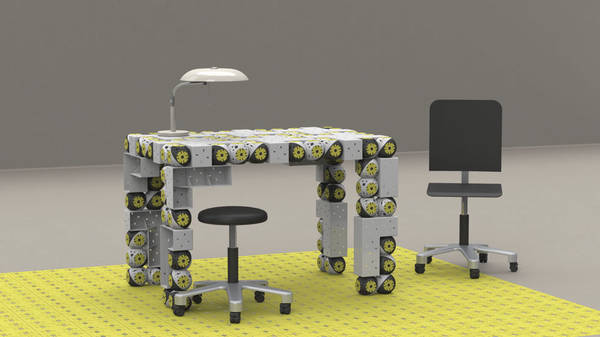
Roombots: autonomous, mobile, evolutionary self-assembling furniture
Roombots: Modular robotics for adaptive and self-organizing furniture (via Beyond the Beyond)
Long-exposure photo of Roomba coverage
Concept for swarming "display blocks"
What happens to junk left behind in foreclosed homes?
http://feedproxy.google.com/~r/boingboing/iBag/~3/8bYK2xityP4/roombots-autonomous.html
Roombots: autonomous, mobile, evolutionary self-assembling furniture
Roombots: Modular robotics for adaptive and self-organizing furniture (via Beyond the Beyond)
Long-exposure photo of Roomba coverage
Concept for swarming "display blocks"
What happens to junk left behind in foreclosed homes?
http://feedproxy.google.com/~r/boingboing/iBag/~3/8bYK2xityP4/roombots-autonomous.html
Tuesday
FontPark Is a Searchable, Sortable Database of Over 70,000 Free Fonts [Fonts]
Fonts are available for personal and/or commercial use, and will work on Windows, Mac, and Linux.
FontPark Is a Searchable, Sortable Database of Over 70,000 Free Fonts [Fonts]
Fonts are available for personal and/or commercial use, and will work on Windows, Mac, and Linux.
Monday
ACADEMY CERTIFICATION - from on-site training to webinars to e-learning...
Took one-on-one consultative projects and 'flipped' the work back to the clients, using online documentation, shared spreadsheets for data transformations, and data import validation. Developed an industry-first certification process for on-boarding of new clients, new staff, and new users through an online educational Academy, with automatically provisioned certification process.
Access to the online training Academy movies and certification exams was given to both internal staff and over 500 organizations across North America, amassing over 100,000 end users. The yearly completion rate for certified IRM Users was approximately 95%, and the advanced IRM Administrator certification rate was approximately 85% per year.