your originating ip address

Showing posts with label work from home. Show all posts

Wednesday

What is your Social Strategy?

Looking to break into a social media career? Here’s pretty much everything you need to know about the job and the people who do it every day. Nearly 80% of corporations use social media, so there’s plenty of opportunity for aspiring strategists — especially as the other 20% get on board.


Step 1: Get a Twitter account — 100% of social media managers represented in the survey have one, and you have to know the lay of the land if you’re going to innovate and build a brand on said land.

Step 2: Be ready to wear many hats. When it comes to social media, there’s a lot to tackle, including crafting actual posts, analyzing metrics, training and managing a team, spearheading campaigns, working with agencies and managing a budget.

Want to know if you’re cut out for it? In the infographic "gist" above, you’ll see the personality traits, education, career paths and responsibilities of today’s successful social media strategists. Statistics were pulled from LinkedIn data, job listings for positions in the field, and a report by Jeremiah Owyang of Altimeter Group.

Enjoy, alright?


Friday

Powerline Ethernet Adapters and Powerstrip Liberators


I've used various powerline adapters for several years. They now can go up to 500 megabits per second, but 85 or 200 will be cheaper. I currently use TrendNet Powerline routers.


Why not use wifi? The bands are becoming crowded. You can try to use 5Ghz N routers, and they help, but if all your other devices - your phone, iPod, Kindle all have to use the 2.4GHz wifi, it can get congested. Wireless USB peripherals and Bluetooth also use the same band. Not everything supports the 5GHz band, so your laptop might not
work, or you will need a special card or adapter for your desktop. Then there's securing things and getting the network password right. And in apartments, every one of your neighbors is using the same band.


Powerline adapters need passwords, but they are between the adapters and you only have to use the setup utility once. They are basically ethernet bridges. I have my cable router plugged in where the cable comes in and the signal is best, then have my wifi and powerline adapters plugged into that router (it has 4 ports). I've not had any problem streaming or even sending files between computers. I have several 200Mb/s refurbished models and they work well for that, but I have gigabit switches at my central computer "nerve center". The powerline adapters also make printers a lot easier to setup. I have a Brother printer that is finicky about Wifi: it can attach USB, Ethernet, or Wifi, but even after typing in the correct information when attached with one of these other methods it often "fails to associate". Instead, I just use the powerline adapter, and instantly it is on ethernet with no headaches.


Ziotek ZT1212542 Power Strip Liberator 14-Inch Extension, 5-Pack.jpeg


Well, there is one. A powerline adapter uses up an electrical socket, which is where the "Liberator" comes in. Basically, a 3 pronged pass-through extension cord. The short plug-depth seems to play well with the powerline adapter, and the extension is hefty enough for my laser printer. The Liberators also work well with power strips or even to go sideways when space is at a premium.


There are a few rare cases where powerline adapters have problems. One is if there is something extremely electrically noisy on the same branch (and if it isn't noisy you need the passwords to prevent your neighbors from snooping). This usually involves some huge motor, arc welding, or other industrial process involving intermittent high current. Another thing is if there are any ground loops or ifhot and ground get swapped by adapters or bad wiring. Also it helps to avoid circuits with dimmers and microwaves, though I've only had the problem when some part of the house wiring was wrong enough to show bars on my old CRT TV when the microwave was on. The powerline signal cannot pass through the large (utility pole) transformers. There is a length limit, but I haven't been in a position to see how fast the signal goes at hundreds or thousands of feet.


If wifi works and the total cost of adapters and such is low, it might be a be a better solution, but for reasonable distances where there is lots of interference or if you only have ethernet, nothing beats powerline adapters.

-- Thomas Z

TRENDnet 200 Mbps Powerline AV Adapter Kit
$72


Available from Amazon


TRENDnet 500 Mbps Powerline AV Adapter Kit
$100


Available from Amazon


Power Strip Liberators
14-inches long
Pack of five for $12


Available from Amazon


Manufactured by TRENDnet


Sample Excerpts:


powerline schematic.jpg
This illustration demonstrates how the powerline can be used to extend the range of a home's ethernet without additional wiring or the use of WiFi.


Thursday

Hello!


Moshi Moshi Manual Cellphone Handset

Posted: 18 May 2011 08:03 AM PDT

In these days of the ubiquitous cellphone, it can be rare to use a "normal" phone, even if you spend most of your days desk bound. As much as I love my iPhone, when I'm sitting in my office I miss using my desk phone with its comfortable handset and easy to dial keypad. Additionally, as someone who likes to listen to music when I work, an incoming call on my iPhone means unplugging it from the cradle, a minor annoyance.

Native Union has solved my problem with a series of handsets that allow you to take calls using a traditional handset attached to your cellphone. I picked up the MM02, a fairly basic corded model featuring a cradle, that I have really come to appreciate (they make a cordless Bluetooth version, but it is significantly more expensive).

The handset connects to the iPhone via the 3.5mm socket on the top of the phone, leaving you free to rest the iPhone in the charging cradle, audio device etc. The handset is reassuringly solid, with a pleasant, matte plastic feel to it, and the well built cradle sits happily on a desk. There is an answering button in the centre of the handset that makes it easy to pick up calls, but one downside is that there is no keypad on the handset, so although you can dial out you need to use the keypad on your mobile handset itself, and that can be a bit fiddly. If you're flying a desk like me, you may find that you make your outgoing calls on your desk phone anyway.

I've had the MM02 handset for around 6-months now and find it a delight to use. At the time of purchase it seemed to be the only accessory of its type. Overall, a very handy piece of kit, especially if you're a desk-bound cellphone user.

-- Alan Arthur

[Although the reviewer notes that he used the handset solely in conjunction with his cellphone, this handset can be used with any product containing a 3.5 mm socket including a laptop or iPad thereby making Skype or Google Voice calling a little bit more traditional and comfortable on unwieldy devices. --OH]

Native Union Moshi Moshi 02 Handset
$44
Available from Amazon


Native Union Moshi Moshi 01H Handset (without a cradle)
Available in a variety of colors
$29

Available from Amazon

Manufactured by Native Union

Sample Excerpts:

Native Union MM01H ).jpeg
Native Union makes an even simpler retro model, the MM01H, that comes in a variety of colors while being a bit more affordable for those who don't need a desktop cradle.


Friday

Portable kit for your mobile devices...


Cool Tools update


AmazonBasics Electronics Travel Case


Posted: 05 May 2011 08:12 AM PDT


I've been using this simple but well designed electronics case for 5 months now. I travel a lot, usually 2 - 3 weeks a month. I also work in IT, so you can imagine all the gadgets I have to carry with me. This case makes the hassle of travelling with electronics a dream!


In the rigid plastic case I safely store my ipod, cellular modem, portable router, backup Lithium Polymer charger, voice recorder, and all of the cables for them and other devices I have on me. They all stay together in a nice neat package. So I never lose them, or forget one when I go on the road.
AmazonBasics Universal Travel Case for Small Electronics and Accessories (cameras; mobile phones; GPS units) (Black)-1.jpeg
To be honest, I had never used anything even remotely like this before I found the one from AmazonBasics. None of my other packing solutions come close, and after looking around for a month I still can't find anything that compares to it. Normally all of my devices have a case of their own, which I've tried to use, but that means there are 5 separate cases with cables, etc and I always end up misplacing something. This case allows me to keep everything I need in one neat little case, and for $14, a better tool is hard to come by!

-- Jeremy Pavleck

AmazonBasics Universal Travel Case for Small Electronics
$14


Available from Amazon


Manufactured by AmazonBasics


[Note: This was the first time I had heard of AmazonBasics, but it appears to be Amazon's in-house brand of electronics accessories. The reviews are overwhelmingly positive, and prices seem affordable compared to the competition. Keep them in mind next time you need a case! --OH]


Portable kit for your mobile devices...


Cool Tools update


AmazonBasics Electronics Travel Case


Posted: 05 May 2011 08:12 AM PDT


I've been using this simple but well designed electronics case for 5 months now. I travel a lot, usually 2 - 3 weeks a month. I also work in IT, so you can imagine all the gadgets I have to carry with me. This case makes the hassle of travelling with electronics a dream!


In the rigid plastic case I safely store my ipod, cellular modem, portable router, backup Lithium Polymer charger, voice recorder, and all of the cables for them and other devices I have on me. They all stay together in a nice neat package. So I never lose them, or forget one when I go on the road.
AmazonBasics Universal Travel Case for Small Electronics and Accessories (cameras; mobile phones; GPS units) (Black)-1.jpeg
To be honest, I had never used anything even remotely like this before I found the one from AmazonBasics. None of my other packing solutions come close, and after looking around for a month I still can't find anything that compares to it. Normally all of my devices have a case of their own, which I've tried to use, but that means there are 5 separate cases with cables, etc and I always end up misplacing something. This case allows me to keep everything I need in one neat little case, and for $14, a better tool is hard to come by!

-- Jeremy Pavleck

AmazonBasics Universal Travel Case for Small Electronics
$14


Available from Amazon


Manufactured by AmazonBasics


[Note: This was the first time I had heard of AmazonBasics, but it appears to be Amazon's in-house brand of electronics accessories. The reviews are overwhelmingly positive, and prices seem affordable compared to the competition. Keep them in mind next time you need a case! --OH]


Friday

GeekDesk


Reposted from Cool Tools.

The GeekDesk is the best and most versatile desk I have found for my home office. It uses an electric motor to switch from sitting to standing position, and after nearly a year of using other standing desks I can say that it is one of the best investments anyone can make if they are interested in an adjustable desk.

My foray into standing desks began when I started working from home more often. I found that when I was sitting at work I would easily become distracted and more often than not lethargic. After reading several articles about the perils of sitting around all day I decided it was probably in my best interest to get a standing desk. My first standing desk was a podium I found on craigslist for $10. It was not adjustable, had an angled surface, and wasn't the best solution. But for the cost, it served me well. I learned how to stand all day, and the small footprint of the podium meant that I could keep my regular desk without sacrificing too much space. The difference between sitting and standing was immediately noticeable. I was much more likely to walk away from my desk and do something that needed to get done, I found that I didn't tire as much, and that my back no longer hurt from long days in a soft cushy chair. I was a standing desk convert.

Given the limitations of the podium I then decided to replace it with a used AnthroCart desk: a solid American-made adjustable desk with an amazing life-time warranty. Seeing how it was adjustable I was able to fine-tune the height so that it made for easy typing. The desk was composed of three aluminum poles that have slots that range from 24" to 30" (and up to 48" with extensions) in height where you could screw the work surface in. It had a large 3'x3' flat surface that allowed me to add an external monitor and a printer to my setup. However, it also meant that I had to say goodbye to my chair and sitting desk. My conversion to full-time standing desk was pleasant, but there were times when I wished I could sit down to write longer pieces.

All of this explains why I am so happy to have discovered the GeekDesk. Simply put, it is a traditional two-legged desk frame that uses an electric motor to raise or lower the working surface from 26" to 46.5" and anywhere in-between. It can lift up to 175 pounds, and it rises and falls at 1" per second.

The desk itself is made up of two steel legs connected by a cross bar that contains the electric motor and rack-and-pinion lift mechanism. The top of the desk is screwed on to the legs. GeekDesk sells the legs separately for those interested in attaching their own surface.

I have the slightly smaller GeekDesk Mini. It is identical to the GeekDesk except that it comes with a shorter crossbar that is 37.75" wide compared to the standard 61.42" model. It is more than enough space for me as I have a fairly compact setup including a 15" laptop, and a 24" external monitor.

To raise or lower the desk there are controls attached to the underside of the working surface. They remain out of the way, and are very easy to use. Simply push the button to activate, and click up or down on the toggle. It is a smooth movement and you can do it with everything on your desk without a fear of spills, or toppling monitors.

While my AnthroCart desk served me well, I realized that having the versatility of being able to sit and stand at the same workspace was really valuable to me. The biggest downside of this flexibility is that the temptation to sit is ever present. Since adopting the GeekDesk I do find myself sitting down more often than I would if I didn't have the option. I am undecided about whether this is a good or bad thing, but if you find that you have low self control then it is possible this desk isn't for you.

I love being able to sit and stand at my workspace, and I believe it has improved my general well being and happiness while working from home. A word of warning: anybody interested in switching to standing all day should, as with anything bio-mechanical, take it slow and make sure not to cause too much strain. I have had friends who have made the switch too quickly complain about back strain, foot pain, and tired legs. This goes away, but can easily be avoided by slowly easing into standing all day. And I strongly believe the GeekDesk represents one of the absolute best ways to do so. -- Oliver Hulland

[Note: GeekDesks ship by freight, only to the U.S. and Canada.-- OH]

GeekDesk Mini
Frame dimensions: 37.75" wide x 22" deep
Desk Surface: 47.25" wide x 31.5" deep
$525 for the frame (plus $85-$180 for shipping)
$749 for the frame and top (plus $110-$310 for shipping)

GeekDesk
Frame dimensions: 61.42" wide x 22" deep
Desk surface is 78.75" wide x 31.5" deep
$799 for the frame and top (plus $110-$310 for shipping)

Available from and manufactured by GeekDesk


GeekDesk


Reposted from Cool Tools.

The GeekDesk is the best and most versatile desk I have found for my home office. It uses an electric motor to switch from sitting to standing position, and after nearly a year of using other standing desks I can say that it is one of the best investments anyone can make if they are interested in an adjustable desk.

My foray into standing desks began when I started working from home more often. I found that when I was sitting at work I would easily become distracted and more often than not lethargic. After reading several articles about the perils of sitting around all day I decided it was probably in my best interest to get a standing desk. My first standing desk was a podium I found on craigslist for $10. It was not adjustable, had an angled surface, and wasn't the best solution. But for the cost, it served me well. I learned how to stand all day, and the small footprint of the podium meant that I could keep my regular desk without sacrificing too much space. The difference between sitting and standing was immediately noticeable. I was much more likely to walk away from my desk and do something that needed to get done, I found that I didn't tire as much, and that my back no longer hurt from long days in a soft cushy chair. I was a standing desk convert.

Given the limitations of the podium I then decided to replace it with a used AnthroCart desk: a solid American-made adjustable desk with an amazing life-time warranty. Seeing how it was adjustable I was able to fine-tune the height so that it made for easy typing. The desk was composed of three aluminum poles that have slots that range from 24" to 30" (and up to 48" with extensions) in height where you could screw the work surface in. It had a large 3'x3' flat surface that allowed me to add an external monitor and a printer to my setup. However, it also meant that I had to say goodbye to my chair and sitting desk. My conversion to full-time standing desk was pleasant, but there were times when I wished I could sit down to write longer pieces.

All of this explains why I am so happy to have discovered the GeekDesk. Simply put, it is a traditional two-legged desk frame that uses an electric motor to raise or lower the working surface from 26" to 46.5" and anywhere in-between. It can lift up to 175 pounds, and it rises and falls at 1" per second.

The desk itself is made up of two steel legs connected by a cross bar that contains the electric motor and rack-and-pinion lift mechanism. The top of the desk is screwed on to the legs. GeekDesk sells the legs separately for those interested in attaching their own surface.

I have the slightly smaller GeekDesk Mini. It is identical to the GeekDesk except that it comes with a shorter crossbar that is 37.75" wide compared to the standard 61.42" model. It is more than enough space for me as I have a fairly compact setup including a 15" laptop, and a 24" external monitor.

To raise or lower the desk there are controls attached to the underside of the working surface. They remain out of the way, and are very easy to use. Simply push the button to activate, and click up or down on the toggle. It is a smooth movement and you can do it with everything on your desk without a fear of spills, or toppling monitors.

While my AnthroCart desk served me well, I realized that having the versatility of being able to sit and stand at the same workspace was really valuable to me. The biggest downside of this flexibility is that the temptation to sit is ever present. Since adopting the GeekDesk I do find myself sitting down more often than I would if I didn't have the option. I am undecided about whether this is a good or bad thing, but if you find that you have low self control then it is possible this desk isn't for you.

I love being able to sit and stand at my workspace, and I believe it has improved my general well being and happiness while working from home. A word of warning: anybody interested in switching to standing all day should, as with anything bio-mechanical, take it slow and make sure not to cause too much strain. I have had friends who have made the switch too quickly complain about back strain, foot pain, and tired legs. This goes away, but can easily be avoided by slowly easing into standing all day. And I strongly believe the GeekDesk represents one of the absolute best ways to do so. -- Oliver Hulland

[Note: GeekDesks ship by freight, only to the U.S. and Canada.-- OH]

GeekDesk Mini
Frame dimensions: 37.75" wide x 22" deep
Desk Surface: 47.25" wide x 31.5" deep
$525 for the frame (plus $85-$180 for shipping)
$749 for the frame and top (plus $110-$310 for shipping)

GeekDesk
Frame dimensions: 61.42" wide x 22" deep
Desk surface is 78.75" wide x 31.5" deep
$799 for the frame and top (plus $110-$310 for shipping)

Available from and manufactured by GeekDesk


Wednesday

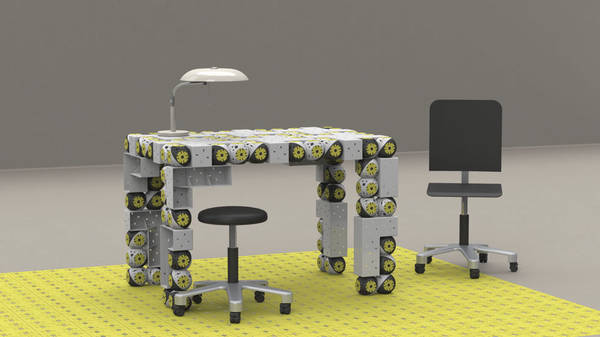
Roombots: autonomous, mobile, evolutionary self-assembling furniture


Roombots are autonomous, roving furniture segments that cruise around your house, looking for each other and spontaneously organizing themselves into furnishings that evolve based on how you use them. It's a project from the École Polytechnique Fédérale de Lausanne. This project intends to design and control modular robots, called Roombots, to be used as building blocks for furniture that moves, self-assembles, self-reconfigures, and self-repairs. Modular robots are robots made of multiple simple robotic modules that can attach and detach (Wikipedia: Self-Reconfiguring Modular Robotics).


Connectors between units allow the creation of arbitrary and changing structures depending on the task to be solved. Compared to "monolithic" robots, modular robots offer higher versatility and robustness against failure, as well as the possibility of self-reconfiguration. The type of scenario that we envision for the Rolex Learning Center is a group of Roombots that autonomously connect to each other to form different types of furniture, e.g. stools, chairs, sofas and tables, depending on user requirements. This furniture will change shape over time (e.g. a stool becoming a chair, a set of chairs becoming a sofa) as well as move using actuated joints to different locations depending on the users needs. When not needed, the group of modules can create a static structure such as a wall or a box.

Roombots: Modular robotics for adaptive and self-organizing furniture (via Beyond the Beyond)

Long-exposure photo of Roomba coverage
Concept for swarming "display blocks"
What happens to junk left behind in foreclosed homes?


http://feedproxy.google.com/~r/boingboing/iBag/~3/8bYK2xityP4/roombots-autonomous.html

Roombots: autonomous, mobile, evolutionary self-assembling furniture


Roombots are autonomous, roving furniture segments that cruise around your house, looking for each other and spontaneously organizing themselves into furnishings that evolve based on how you use them. It's a project from the École Polytechnique Fédérale de Lausanne. This project intends to design and control modular robots, called Roombots, to be used as building blocks for furniture that moves, self-assembles, self-reconfigures, and self-repairs. Modular robots are robots made of multiple simple robotic modules that can attach and detach (Wikipedia: Self-Reconfiguring Modular Robotics).


Connectors between units allow the creation of arbitrary and changing structures depending on the task to be solved. Compared to "monolithic" robots, modular robots offer higher versatility and robustness against failure, as well as the possibility of self-reconfiguration. The type of scenario that we envision for the Rolex Learning Center is a group of Roombots that autonomously connect to each other to form different types of furniture, e.g. stools, chairs, sofas and tables, depending on user requirements. This furniture will change shape over time (e.g. a stool becoming a chair, a set of chairs becoming a sofa) as well as move using actuated joints to different locations depending on the users needs. When not needed, the group of modules can create a static structure such as a wall or a box.

Roombots: Modular robotics for adaptive and self-organizing furniture (via Beyond the Beyond)

Long-exposure photo of Roomba coverage
Concept for swarming "display blocks"
What happens to junk left behind in foreclosed homes?


http://feedproxy.google.com/~r/boingboing/iBag/~3/8bYK2xityP4/roombots-autonomous.html

Tuesday

FontPark Is a Searchable, Sortable Database of Over 70,000 Free Fonts [Fonts]

FontPark is a great big database of free fonts.


Fonts are available for personal and/or commercial use, and will work on Windows, Mac, and Linux.


FontPark Is a Searchable, Sortable Database of Over 70,000 Free Fonts [Fonts]

FontPark is a great big database of free fonts.


Fonts are available for personal and/or commercial use, and will work on Windows, Mac, and Linux.


Wednesday

TWORK...TWITTER TWEETS AT WORK

HOW I TWEET:

  1. Answer the question "What is INTERESTING?" rather than "What are you doing?"
  2. Use your Follow Friends to filter the most relevant Tweets for your interests.
  3. Retweet so that anyone Following me can use me as a filter for interesting news.

Once your Twitter account has "hundreds" of Followers, it's interesting that more and more Followers start Following you non-stop after a certain point, eh?


twitter tweet bird follower trending

HOW I FIND NEWS:


My Friends' Tweets have acted like a springboard to a wealth of informative sites.
Hashtags can be used like bookmarks when I Retweet these informative sites, and I can go back through and connect these to my own work;
if I'm lucky, by the time I go back to the hashtag, others have added similar Tweets under the same hashtag.
monster following

HOW TO GET RELEVANT FOLLOWERS

If you are promoting your business, you don't really want "anyone" to Follow your business' Twitter activity. You want relevant Followers that are actually interested in becoming a customer someday, right?

For marketing purposes, Tweets need to be sent in volleys of three to eight at a time, as close to each other as possible (you might consider using 3-8 multiple Tabs in your browser to achieve this).
One pattern that still seems to attract new Followers to you:
Tweet 1: interesting business news
Tweet 2: relevant information that is Trending at the moment
Tweet 3: your advertisement, promotion, or marketing
Tweet 4: interesting news
Tweet 5: relevant information that is Trending with a Hashtag at the moment
Tweet 6: your coupon (ala Dell)
Tweet 7: personal insight
Tweet 8: interesting business news

RESULTS: This model is used by people that perform SEO and SEM, and using it will give you at least the same number of interested Followers as the number of your Tweets...

IMPORTANT: Most of your Tweets ought to include links for full articles or for marketing links.
Marketing links need to go to "painless" actions...
think email subscriptions, automatic enrollments, satisfaction guarantees, and discounted payment pages with items already "in the cart."


LIVE AND SHARE IDEAS THAT WORK
thanks from ifranks

TWORK...TWITTER TWEETS AT WORK

HOW I TWEET:

  1. Answer the question "What is INTERESTING?" rather than "What are you doing?"
  2. Use your Follow Friends to filter the most relevant Tweets for your interests.
  3. Retweet so that anyone Following me can use me as a filter for interesting news.

Once your Twitter account has "hundreds" of Followers, it's interesting that more and more Followers start Following you non-stop after a certain point, eh?


twitter tweet bird follower trending

HOW I FIND NEWS:


My Friends' Tweets have acted like a springboard to a wealth of informative sites.
Hashtags can be used like bookmarks when I Retweet these informative sites, and I can go back through and connect these to my own work;
if I'm lucky, by the time I go back to the hashtag, others have added similar Tweets under the same hashtag.
monster following

HOW TO GET RELEVANT FOLLOWERS

If you are promoting your business, you don't really want "anyone" to Follow your business' Twitter activity. You want relevant Followers that are actually interested in becoming a customer someday, right?

For marketing purposes, Tweets need to be sent in volleys of three to eight at a time, as close to each other as possible (you might consider using 3-8 multiple Tabs in your browser to achieve this).
One pattern that still seems to attract new Followers to you:
Tweet 1: interesting business news
Tweet 2: relevant information that is Trending at the moment
Tweet 3: your advertisement, promotion, or marketing
Tweet 4: interesting news
Tweet 5: relevant information that is Trending with a Hashtag at the moment
Tweet 6: your coupon (ala Dell)
Tweet 7: personal insight
Tweet 8: interesting business news

RESULTS: This model is used by people that perform SEO and SEM, and using it will give you at least the same number of interested Followers as the number of your Tweets...

IMPORTANT: Most of your Tweets ought to include links for full articles or for marketing links.
Marketing links need to go to "painless" actions...
think email subscriptions, automatic enrollments, satisfaction guarantees, and discounted payment pages with items already "in the cart."


LIVE AND SHARE IDEAS THAT WORK
thanks from ifranks

Tuesday

BOOKMARKS - WORK ANYWHERE NOW!

1) ASSUMPTION
Major software applications that you need to get your work done are already, or soon will be, in the online cloud; all you will need is the right URL, username, and password to "get to work."

social networking

2) THE WAY WE WORK NOW
People are getting their work done in offices, at homes, and en route because laptop computers, fully-featured mobile phones with browsers, and public computer kiosks are ubiquitous.

3) A TINY TOOL BECOMES A HUGE LEVER
We can "work anywhere" with the right URL, username, and password.
Thus our URLs, usually kept as favourites or bookmarks in our favourite (favorite) internet browser, become the first stepping stone to reach our "work anywhere" office.


bookmark bookmarks

FREE SOLUTIONS...
DEL.ICIO.US
Challenging to add new bookmarks with mobile phone browsers because the functionality of "Submit" buttons need to be simplified.

Well developed bookmarks that can be made public for social networking (i.e. how many other people using Delicious have bookmarked the same URL that I added).
Mobile phone browsers can log-in and use existing bookmarks.
Owned by Yahoo.

YAHOO BOOKMARKS
As of this writing, still very Beta with low search ability.

Good import ability.

DIIGO
Challenging to add new bookmarks with mobile phone browsers because the functionality of "Submit" buttons need to be simplified.
Challenging exportability because Tag details are lost.
Delayed updates to large quantities of bookmarks due to reindexing.

Well developed bookmarks that can be made public for social networking (i.e. what are other people using Diigo saying about the same URL that I added).
Mobile phone browsers can log-in and use existing bookmarks.
Previous views of websites are stored in cache, which is useful for defunct pages.
Based in Australia, and new owners of Furl.

favorite favorites

GOOGLE BOOKMARKS (my choice)
Rushed development, but it works
(e.g. the Google Cart logo appears in older versions of Internet Explorer,
the Add and other functions appear at the bottom, after scrolling through your entire list of Labels).
Bookmarks are private, without social quantifiers nor caching.

Good search ability (of course).
Can add new links with mobile phone browsers because of simplified "Submit" button.
Good exportability.

TAKE HOME MESSAGE
Move your bookmarks and favorites out of your current browsers (i.e. home computer, work computer, and mobile phone) and import them into an all-in-one online bookmarking tool.
This will merge your collection of URLs, centralize access to them, and help you to truly "work from anywhere."


thanks from ifranks

More...